
Download eiktub – Free Arabic Keyboard Tool for Windows (2025)
Introducing eiktub: The Ultimate Free Arabic Keyboard Tool for Windows
If you're searching for a reliable, lightweight, and free solution to type Arabic on your Windows PC, eiktub is an excellent choice. Developed by LinguArabica LLC, this powerful keyboard utility allows users to type Arabic text seamlessly using standard keyboard layouts—no complicated setup required. Since its release in 2011, eiktub has gained popularity across the globe, especially in Germany, Ukraine, and Malaysia, where Arabic language learners and professionals frequently use it.
With over 57,000 downloads and consistent usage even today, this tool proves its long-term value and stability. Despite being over a decade old, eiktub continues to deliver a smooth experience, thanks to its minimal resource usage and straightforward design. The current version, 1.2, was last updated on June 30, 2011, and while no new updates have been released since, its core functionality remains intact and highly effective.
One of the standout features is its compatibility with older Windows systems, including Windows XP and earlier versions, making it ideal for users with legacy hardware. Whether you're a student writing an Arabic essay, a researcher translating documents, or a professional managing multilingual content, eiktub simplifies the process. The software is completely free to download and use, with no hidden fees or trial limitations.
It’s also secure—no ads, no malware, and no data collection. With its small footprint, eiktub runs efficiently in the background without slowing down your system. This makes it a perfect tool for users who prioritize performance and simplicity.
If you're looking for a dependable way to type Arabic on your Windows PC without installing complex language packs, eiktub is worth trying.
Key Features of eiktub: Simple, Fast, and Reliable
What makes eiktub stand out among other Arabic typing tools is its focus on simplicity and efficiency. The software is designed to be intuitive, requiring no technical knowledge to operate. Once installed, you can switch between your default keyboard layout and the Arabic layout with just a few keystrokes.
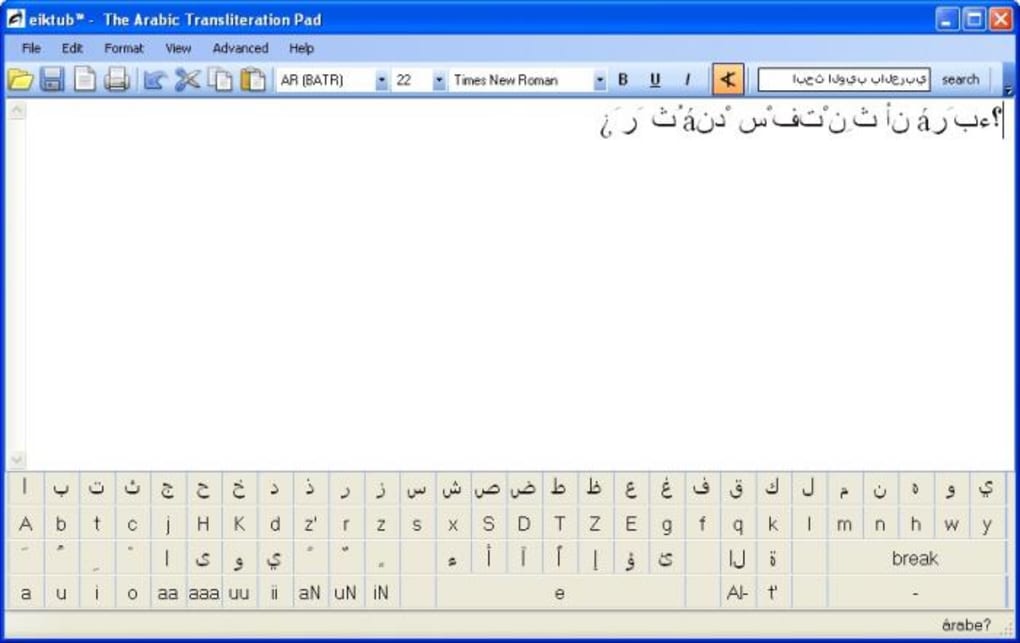
This seamless integration ensures that you can type in Arabic without interrupting your workflow. The core feature of eiktub is its transliteration system, which allows you to type Arabic letters using Latin characters. For example, typing "salam" will automatically convert to "سَلَام".
This method is particularly helpful for users who are not familiar with Arabic keyboard layouts. The tool supports a wide range of Arabic diacritical marks and letter variations, ensuring accurate representation of text. It’s also compatible with various text editors, word processors, and web browsers, so you can use it in Microsoft Word, Google Docs, or any other application.
Another major advantage is its minimal system requirements. eiktub uses very little RAM and CPU, making it suitable for older computers or low-end devices. Unlike many modern software tools that demand high-end specs, eiktub remains lightweight and fast. It doesn’t install unnecessary components or background services, reducing the risk of conflicts with other programs.
Additionally, the interface is clean and distraction-free—no pop-ups, no toolbars, just pure functionality. The software is also fully portable, meaning you can run it from a USB drive without installation, which is perfect for shared or public computers. For users who prefer a no-frills approach, eiktub delivers exactly what it promises: a reliable way to type Arabic using your existing keyboard.
- Transliteration-based Arabic typing using Latin letters
- Supports full Arabic alphabet and diacritical marks
- Lightweight and fast, minimal system resource usage
- Compatible with Windows XP and later versions
- Portable mode – run from USB without installation
- Free to download and use – no ads or hidden costs
- Simple keyboard shortcut switching between languages
How to Install and Use eiktub on Your Windows PC
Installing eiktub is a quick and hassle-free process, especially for users who value simplicity. Since it’s a portable application, you don’t need to go through a complex setup wizard. Here’s a step-by-step guide to get started:
- Download eiktub: Visit the official download page and download the latest version (1.2) from a trusted source. Ensure you’re downloading from a verified site to avoid malware.
- Extract the files: Once downloaded, locate the ZIP file and extract it to a folder of your choice—such as your Desktop or Documents folder.
- Run the application: Open the extracted folder and double-click on the
eiktub.exefile to launch the program. No installation is required. - Enable Arabic typing: After launching, eiktub runs in the background. Press the default shortcut (usually Ctrl + Shift + A) to activate the Arabic input mode.
- Type in Arabic: Start typing using the transliteration method. For example, type "shukran" to get "شكراً". The software instantly converts your input into proper Arabic script.
- Switch back: Press the same shortcut again to return to your default keyboard layout.
For advanced users, you can customize the keyboard shortcut in the settings menu if needed. The configuration is straightforward and accessible through the system tray icon. eiktub also supports multiple language switching, so you can toggle between Arabic and other languages effortlessly. It works in any text field, including email clients, chat apps, and document editors.
Since it’s a standalone tool, it doesn’t interfere with your system’s native language settings. This makes it ideal for temporary use or testing purposes. If you’re using a public computer, you can carry eiktub on a USB drive and use it without leaving any traces.
The entire process takes less than a minute, making it one of the fastest ways to start typing Arabic on Windows.
Compatibility and System Requirements
eiktub is specifically designed for the Windows operating system and is compatible with a wide range of versions, including Windows XP, Windows Vista, Windows 7, Windows 8, and Windows 10. Its ability to run on older systems like Windows XP is a significant advantage, especially for users with legacy hardware or restricted software environments. This backward compatibility ensures that even outdated computers can support Arabic typing without requiring a full OS upgrade.
The software does not require .NET Framework or any other runtime dependencies, which further enhances its portability and ease of use. In terms of system requirements, eiktub is exceptionally lightweight. It consumes less than 5 MB of RAM during operation and uses minimal CPU resources.
This makes it suitable for low-end devices, such as older laptops or netbooks, where performance is a concern. The file size is also small—typically under 10 MB—so it downloads quickly and doesn’t take up much storage space. Unlike many modern tools that require constant updates or internet access, eiktub operates offline and doesn’t need to check for updates.
While this means it hasn’t received new features in over a decade, it also means it remains stable and predictable. For users who value reliability over cutting-edge features, this is a major plus. It’s worth noting that eiktub is not available for Mac, Android, or iOS, so users on non-Windows platforms will need to explore alternatives like Avro Keyboard or Google Input Tools.
However, for Windows users, especially those on older systems, eiktub remains a top-tier option for Arabic input.
Pros and Cons of Using eiktub
Pros
- Completely free to download and use
- Extremely lightweight – minimal system impact
- Runs on Windows XP and later versions
- Portable – can be used from a USB drive
- Simple transliteration system for easy learning
- No ads, no malware, no data collection
- Works in all text fields and applications
Cons
- No recent updates since 2011
- Not available for Mac, Android, or iOS
- Limited customization options
- Does not support modern Windows UI features
- No built-in dictionary or auto-correction
Frequently Asked Questions (FAQ)
Is eiktub safe to download and use?
Yes, eiktub is safe to download and use. It is a free, standalone application developed by LinguArabica LLC. The software does not contain ads, malware, or tracking components. It’s been widely used for over a decade with no reported security issues.
Can I use eiktub on Windows 10 and Windows 11?
Yes, eiktub is fully compatible with Windows 10 and Windows 11. While it was last updated in 2011, it continues to run without issues on modern Windows systems due to its lightweight and simple design.
How do I switch between Arabic and English typing?
Use the default keyboard shortcut Ctrl + Shift + A to toggle between your default keyboard layout and Arabic input mode. You can change this shortcut in the settings if needed.
Is eiktub available for Mac or mobile devices?
No, eiktub is only available for Windows operating systems. Users on Mac, Android, or iOS should consider alternatives like Avro Keyboard or Google Input Tools.
Can I run eiktub from a USB drive?
Yes, eiktub is portable. Simply extract the files to a USB drive and run the .exe file directly. No installation is required, making it ideal for public or shared computers.
Final Verdict: A Time-Tested Tool for Arabic Typing
eiktub remains a solid choice for anyone needing a free, secure, and lightweight Arabic typing tool on Windows. Despite its age, it continues to perform reliably across various Windows versions, from XP to Windows 10. Its simplicity, portability, and lack of bloat make it a standout in a crowded market.
While it lacks modern features like auto-correction or cloud sync, it excels in what it does best: enabling fast, accurate Arabic input using a standard keyboard. If you’re a student, writer, or professional working with Arabic text and want a no-frills solution, eiktub is worth downloading today. It’s completely free, safe, and easy to use.
Don’t miss out—download eiktub now and start typing Arabic effortlessly on your Windows PC.
Home Software Utilities






